Welcome to BESSER’s Documentation
Note
Checkout the latest repository: BESSER-Dataset The B-UML Dataset is a large-scale dataset containing 5,000+ B-UML models for research in modeling languages and AI-assisted modeling.
BESSER (BEtter Smart Software fastER) is a low-modeling low-code open-source platform built on top of our Python-based personal interpretation of a “Universal Modeling Language” (yes, heavily inspired and a simplified version of the better known UML, the Unified Modeling Language).
Note
BESSER is funded thanks to an FNR Pearl grant led by the Luxembourg Institute of Science and Technology with the participation of the Snt/University of Luxembourg and open to all your contributions!
BESSER enables users to model, generate, personalize and deploy smart and complex software systems. BESSER is based around our B-UML language and a number of generators built on top of it (See the high-level architecture below).
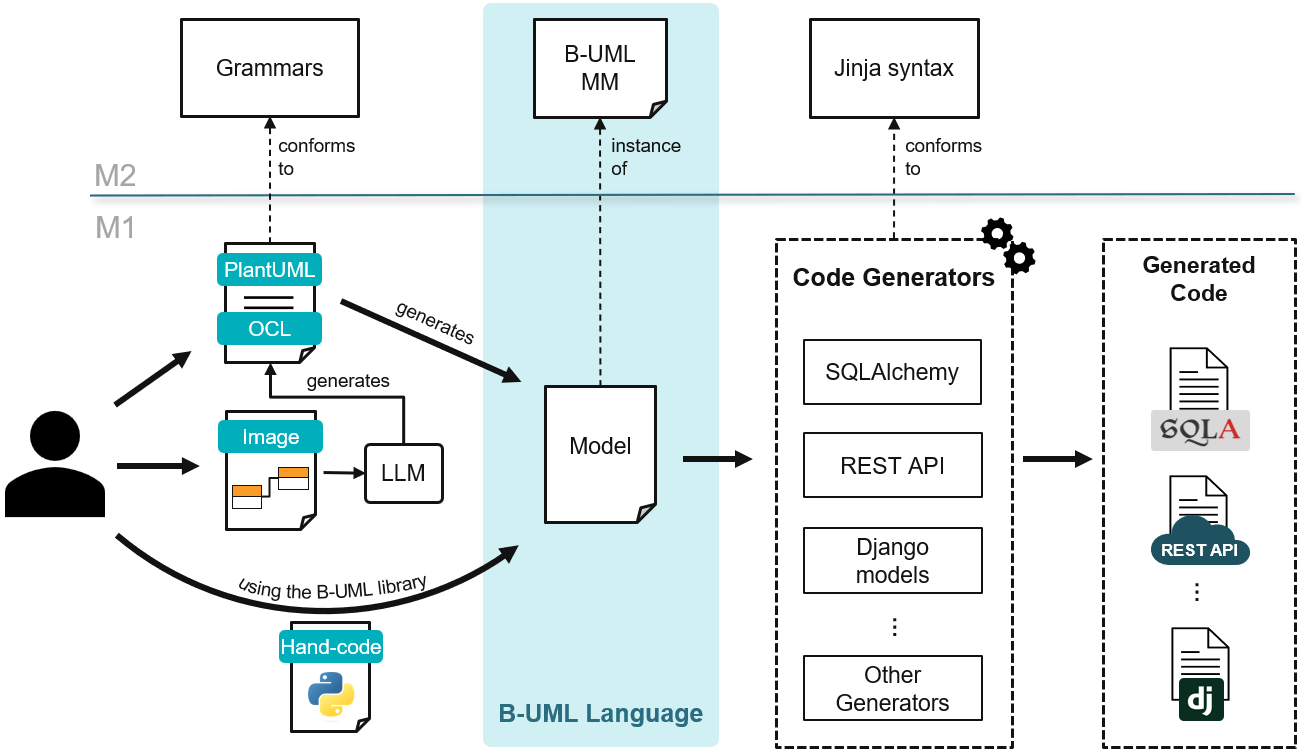
You’ll find here all the necessary information about the B-UML language (to model the problem domain) and the different code generators to produce a deployable solution. You could even build your own code generator for a target technology.
Note
This repository hosts the backend of the BESSER platform: the B-UML metamodel,
generators, utilities, and services that the web modeling editor consumes.
The editor’s frontend is maintained in the BESSER-WEB-MODELING-EDITOR
project, included here only as a submodule (besser/utilities/web_modeling_editor/frontend) for local deployments.
Getting Started
Choose your path depending on what you want to do:
- I want to design models visually
Go to editor.besser-pearl.org and start modeling immediately. See Web Modeling Editor for details.
- I want to use BESSER as a Python library
Install with
pip install besser, then follow the Installation guide. Start with the B-UML Language to learn how to define models in Python, then pick a generator to produce code.- I want to contribute to the project
Read the Contributing section for onboarding, coding standards, and how to add new generators or model types.
- I want to build my own code generator
See Build Your Own Generator for a step-by-step guide to creating and registering a custom generator.