Agent model
Warning
While you can define agents using the B-UML agent metamodel, the BAF generator still has limitations in terms of supported features. If your goal is to develop an agent in a textual notation, we’d recommend to get accustomed to the BAF. The B-UML agent notation is fitting if you plan to re-use agent components in different agents or if you plan to develop/use model-based techniques on the agents. If you aim to develop agents graphically, then the BESSER framework provides a graphical editor for that purpose.
Agent metamodel
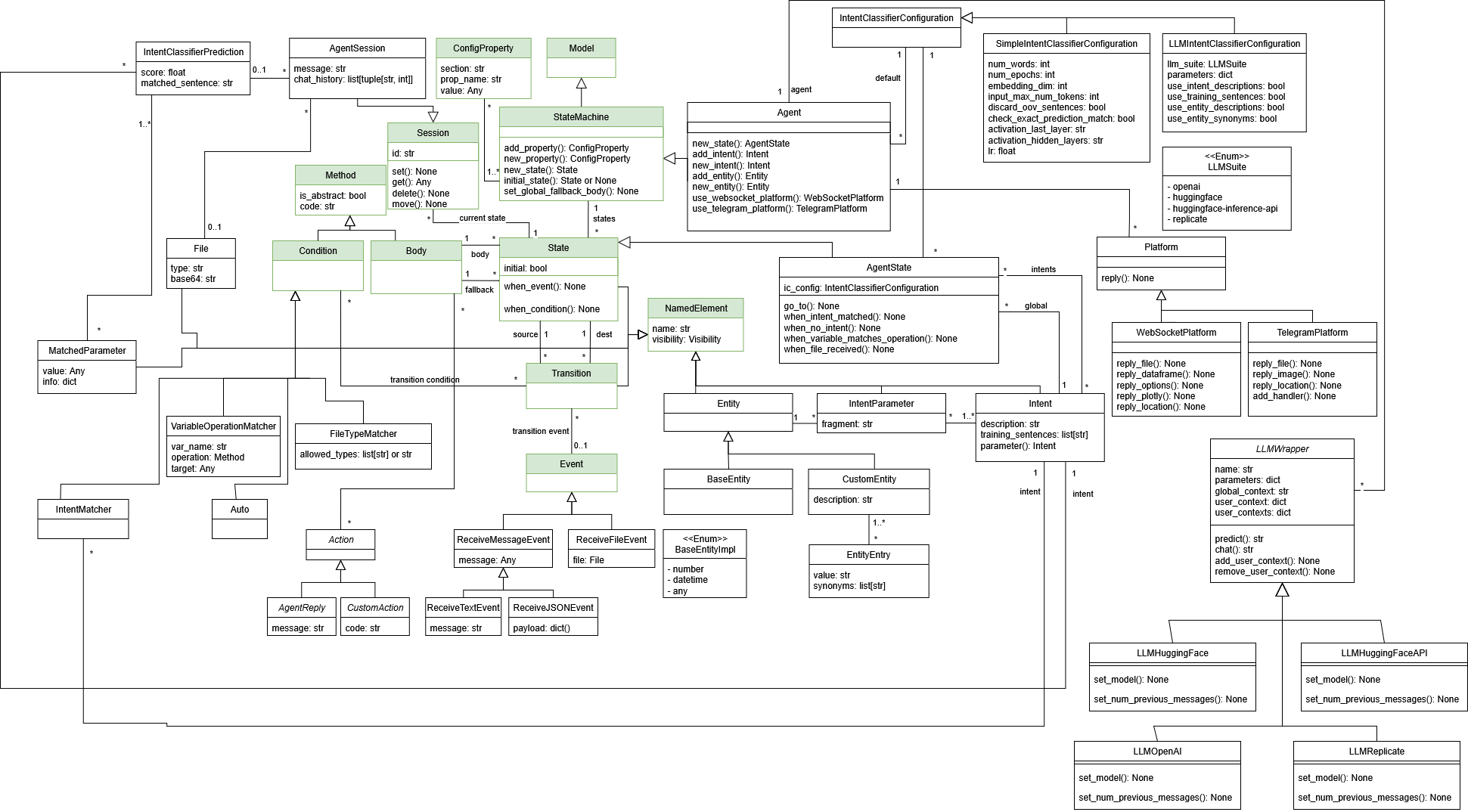
This metamodel allows the definition of agents. The agents follow a state machine-like behavior, where they can be in different states and transition between them based on events and conditions. Thus, similarly to the state machine metamodel, the agent metamodel contains the main elements of a state machine:
AgentState: Represent the different conditions or statuses that an agent can be in at any given time.
Transitions: Define the rules for how an agent moves from one state to another, triggered by events or conditions.
Events: External or internal stimuli (inputs) that cause a check of conditions and potentially trigger transitions between states.
Conditions: Conditions that must be met for a transition to occur, allowing for more complex decision-making.
Actions: Activities or responses (outputs) that occur due to transitions or when the agent is in a specific state. Each state has a Body, which defines the sequence of actions to be executed when an event causes the transition to a state (and a fallback body that defines the actions to be executed in case of error in the machine).
AgentSession: An agent can have multiple sessions running simultaneously (e.g., one for each user interacting with the agent). A Session is always located in one of the states. If there are multiple sessions, each can store data privately (with respect to the other sessions). When modelling an agent, a session is only used as an argument for the events and bodies.
Beyond the state machine-like elements, the agent metamodel also includes agent specific elements. These are closely related to the agent concepts contained in the BESSER Agentic Framework:
Agent
Intent
IntentParameter
Entity
IntentClassifierConfiguration
Platform
LLMWrapper
To read about their meaning and usage, please refer to the documentation of the BESSER Agentic Framework.
Actions
Each state body is a sequence of actions. The following action classes are
available in besser.BUML.metamodel.state_machine.agent:
Text and LLM replies
AgentReply(message)— send a plain-text reply.LLMReply(prompt, llm_name)— generate a reply using an LLM;promptis an optional system prompt,llm_nameselects a registered LLM (defaults to the agent default).LLMChatReply(prompt, llm_name)— likeLLMReplybut callsllm.chat(...)with the conversation history, making it suitable for multi-turn dialogue states.RAGReply(rag_db_name)— answer using a configured RAG database.DBReply(query, llm_name)— answer from a SQL database using an LLM.
Web crawling
WebCrawlLLMReply(initial_url, max_depth, max_pages, crawl_format,
base_url_prefix, run_crawl, no_crawl_error_message, system_message_prefix,
llm_name)
— performs a BFS web crawl starting atinitial_urland queries an LLM with the retrieved content. The crawl result is cached in the session; setrun_crawl=Falsein subsequent states to reuse the cache without re-fetching.
WebSocket rich-media replies
The following actions map to the corresponding WebSocketPlatform methods and
require the agent to use a WebSocketPlatform:
WebSocketReplyMarkdown(message)— send Markdown-formatted text.WebSocketReplyHTML(message)— send an HTML-formatted message.WebSocketReplySpeech(message, audio_speed)— convert text to speech and send the audio.WebSocketReplyOptions(options)— present a list of selectable options.WebSocketReplyLocation(latitude, longitude)— send a geographic coordinate.WebSocketReplyFile()— send a file; the body must supply aFileobject at runtime.WebSocketReplyImage()— send an image (NumPyndarray); body must supply the array at runtime.WebSocketReplyDataframe()— send a pandasDataFrame; body must supply it at runtime.WebSocketReplyPlotly()— send a Plotly figure; body must supply aplotly.graph_objects.Figureat runtime.
RAG (Retrieval-Augmented Generation)
Agents can use RAG to answer questions from a set of documents (e.g. PDFs).
A RAG element is added to an agent via agent.new_rag() and combines a
RAGVectorStore (embedding config), a RAGTextSplitter (chunking strategy),
and an LLM name. Use RAGReply in a state body to trigger a RAG query.
When generated, a data folder named after the RAG element is created
(e.g. "Knowledge Base" produces knowledge_base/). Place your PDF
documents in this folder before running the agent.
The optional llm_prompt parameter injects a fixed prefix instruction before
every RAG query, useful for enforcing domain-specific constraints or tone:
kb = agent.new_rag(
    name='Knowledge Base',
    vector_store=vector_store,
    splitter=splitter,
    llm_name='gpt-4o-mini',
    llm_prompt='Answer only from the provided documents.',
)
Multiple LLMs
An agent can register more than one LLM and reference each by name. Add an
LLM with agent.new_llm():
fast = agent.new_llm(name='fast', provider='openai', parameters={'model': 'gpt-4o-mini'})
big = agent.new_llm(name='big', provider='openai', parameters={'model': 'gpt-4o'})
provider selects the concrete wrapper: openai → LLMOpenAI,
huggingface → LLMHuggingFace, huggingface_api →
LLMHuggingFaceAPI, replicate → LLMReplicate. parameters is a
free-form dict passed to the wrapper (e.g. the model id). Optional
num_previous_messages (default 1) and global_context are also supported.
The first LLM registered becomes the default. Change the default with
agent.set_default_llm('big'). Any consumer — LLMReply, DBReply,
RAGReply and reasoning states — uses the default unless it specifies its
own llm_name. Every llm_name reference must resolve to a registered
LLM; this is checked by agent.validate().
Reasoning states
A ReasoningState is a state whose body is an autonomous reasoning loop
driven by an LLM (using the agent’s tools, skills and workspaces). Create one
with agent.new_reasoning_state():
assistant = agent.new_reasoning_state(
    name='assistant',
    llm='big',                  # registered LLM name; omit to use the default
    max_steps=8,                # max reasoning iterations
    enable_task_planning=True,
    stream_steps=True,
    system_prompt='You are a helpful assistant.',
    fallback_message='Sorry, I could not complete that.',
)
The body of a reasoning state is supplied automatically by the factory; the
metamodel rejects manual set_body / set_fallback_body calls on it.
Tools, skills and workspaces
Reasoning states draw on three agent-level primitives, shared by every reasoning state:
Tools (
agent.new_tool(name, description, code)) — callable functions the agent can invoke.codeholds the Python implementation.Skills (
agent.new_skill(name, content, description)) — reusable instruction snippets injected into the reasoning context.Workspaces (
agent.new_workspace(name, path, description, writable, max_read_bytes)) — file-system locations the agent may read from (and write to whenwritable).
Note
The classes highlighted in green originate from the structural metamodel and state machine .
Example agent model
As a simple example, we modeled the Greetings Agent from the BAF documentation.
import datetime
from besser.BUML.metamodel.state_machine.state_machine import Body, ConfigProperty
from besser.BUML.metamodel.state_machine.agent import Agent, AgentSession
import operator

agent = Agent('Generated_Agent')

agent.add_property(ConfigProperty('websocket_platform', 'websocket.host', 'localhost'))
agent.add_property(ConfigProperty('websocket_platform', 'websocket.port', 8765))
agent.add_property(ConfigProperty('websocket_platform', 'streamlit.host', 'localhost'))
agent.add_property(ConfigProperty('websocket_platform', 'streamlit.port', 5000))
agent.add_property(ConfigProperty('nlp', 'nlp.language', 'en'))
agent.add_property(ConfigProperty('nlp', 'nlp.region', 'US'))
agent.add_property(ConfigProperty('nlp', 'nlp.timezone', 'Europe/Madrid'))
agent.add_property(ConfigProperty('nlp', 'nlp.pre_processing', True))
agent.add_property(ConfigProperty('nlp', 'nlp.intent_threshold', 0.4))

# INTENTS
Greeting = agent.new_intent('Greeting', [
    'Hi',
    'Hello',
    'Howdy',
])
Good = agent.new_intent('Good', [
    'Good',
    'Fine',
    'I m alright',
])
Bad = agent.new_intent('Bad', [
    'Bad',
    'Not so good',
    'Could be better',
])


# STATES
initial = agent.new_state('initial', initial=True)
greeting = agent.new_state('greeting')
bad = agent.new_state('bad')
good = agent.new_state('good')

# initial state
# greeting state
def greeting_body(session: AgentSession):
    session.reply('Hi!')
    session.reply('How are you?')

greeting.set_body(Body('greeting_body', greeting_body))
greeting.when_intent_matched(Good).go_to(good)
greeting.when_intent_matched(Bad).go_to(bad)

# bad state
def bad_body(session: AgentSession):
    session.reply('I m sorry to hear that...')

bad.set_body(Body('bad_body', bad_body))
bad.go_to(initial)

# good state
def good_body(session: AgentSession):
    session.reply('I am glad to hear that!')

good.set_body(Body('good_body', good_body))
good.go_to(initial)