Class Diagrams
Class diagrams provide a visual representation of the structural model in BESSER. This diagram shows the static structure of a system by displaying classes, their attributes, methods, and the relationships between them.
Palette
The palette on the left side of the editor contains various shapes and elements you can use to create your class diagram. These include Classes (with or without methods), Abstract Classes, Interfaces, Enumerations, and OCL Constraints. Other elements like Associations, Generalizations, and Association Classes can be added directly from the canvas.
Getting Started
Classes
To add a class to your diagram, drag and drop a class element from the left panel onto the canvas. You can open and edit the class properties by double-clicking on the class shape:
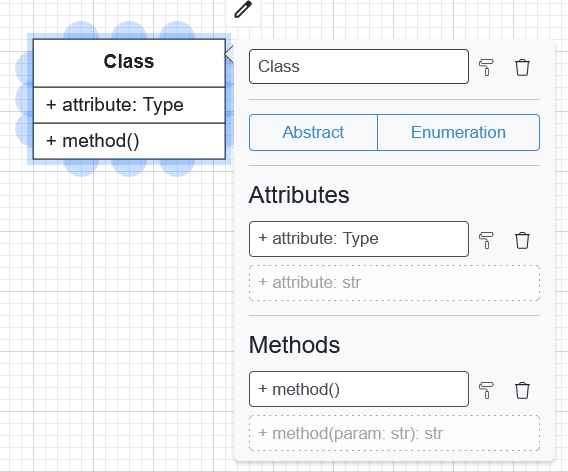
Name: The name of the class (without spaces).
Abstract: Mark the class as abstract if it cannot be instantiated.
Enumeration: Change the type to define an Enumeration.
Attributes: Define the properties of the class.
Methods: Define the behaviors of the class.
Attribute Format
Attributes can be defined using the following format:
<<visibility modifier>> <<attribute_name>> : <<data_type>>
Visibility Modifiers:
+Public (default)-Private#Protected
Supported Data Types:
int, float, str (default), bool, time, date, datetime, timedelta, any. You can also use the name of an Enumeration defined in the diagram.
Examples:
+ age: intaddress(defaults to public string)state: StateList
Method Format
Methods can be defined with parameters and return types:
<<visibility modifier>> <<method_name>>(<<parameter_name>>: <<data_type>>): <<return_type>>
Examples:
+ notify(sms: str = 'message')- findBook(title: str): Bookvalidate()
Associations and Generalizations
To create relationships between classes:
Click the source class.
Drag from a blue connection point to the target class.
Double-click the relationship line to edit its properties.
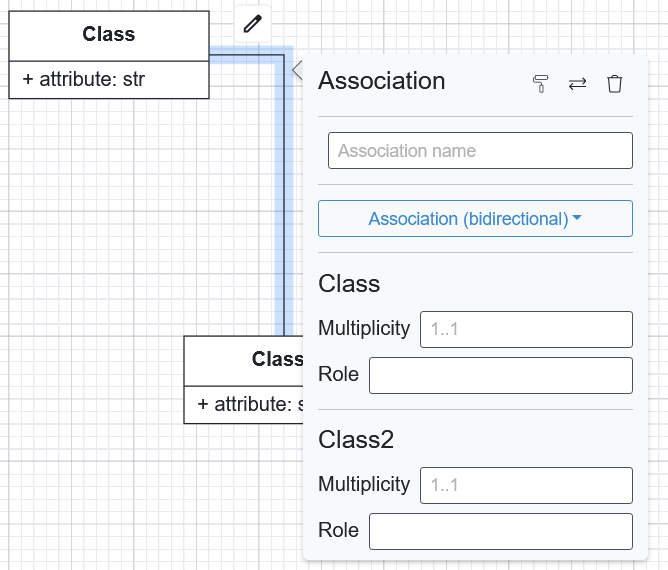
Name: Assign a name to the association.
Type: Association, Composition, or Generalization.
Multiplicity: Define cardinality (e.g.,
1,0..1,*,1..*).Navigable: Each end of an association or composition has its own Navigable checkbox. A navigable end can be reached from the class at the other end. When both ends are navigable the line has no arrowhead; when only one end is navigable, the arrowhead points at that end.
Navigability rules:
At least one end of an association must stay navigable, so the checkbox of the last navigable end is locked.
In a composition, the part end (the end opposite the diamond) is always navigable, because the composite can always reach its parts. Its checkbox is locked.
Diagrams created before per-end navigability keep their meaning when opened: a former unidirectional association becomes an association whose source end is not navigable, and every other association keeps both ends navigable.
OCL Constraints
You can add Object Constraint Language (OCL) constraints to your model:
Drag the OCL shape onto the canvas.
Write constraints in the format
Context "class_name" ....Link them to classes with dotted lines.
Use the Quality Check button to validate the syntax.
Example:
Context "Person"
inv: self.age >= 0 and self.age <= 120
Association Classes
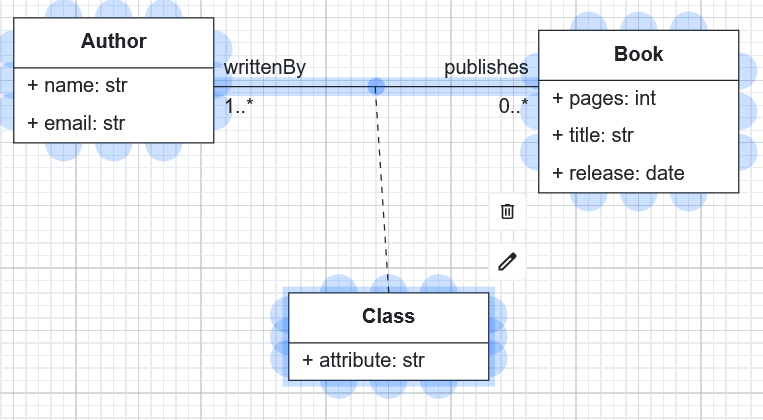
To create an association class:
Drag a Class shape onto the canvas.
Link it to the center point of an existing association using a dotted line.
Define its attributes like a regular class.
Code Generation
Class diagrams support generation for:
Django
FastAPI Backend
Full Web App (combined with a GUI diagram)
SQL DDL
SQLAlchemy
Python Classes
Java Classes
Pydantic Models
JSON Schema
Smart Data Models